Scott Roller

This is my home base to discuss all things Microsoft Dynamics 365 and Power Platform.

Exploring ChatGPT & Copilot in Visual Studio & Power Apps Studio — May 17, 2024

Exploring ChatGPT & Copilot in Visual Studio & Power Apps Studio

In the ever-evolving landscape of app development, efficiency and creativity reign supreme. With the emergence of AI-driven tools like Copilot & ChatGPT, developers are gaining new capabilities that streamline the coding process and foster innovation. Let’s dive into the exciting world of AI generated help and its integration into Visual Studio and Power Apps Studio, unlocking a new era of productivity and collaboration.

Introducing Copilot: AI-Powered Coding Assistant

Copilot & ChatGPT, developed by OpenAI and Microsoft, is an AI-powered assistant trained on vast repositories of code, capable of generating suggestions, completing code snippets, and providing context-aware recommendations in real-time. By leveraging machine learning algorithms, Copilot & ChatGPT augments developers’ capabilities, enabling them to write code faster, reduce errors, and explore new ideas with confidence.

Copilot in Power Apps Studio: Revolutionizing App Development

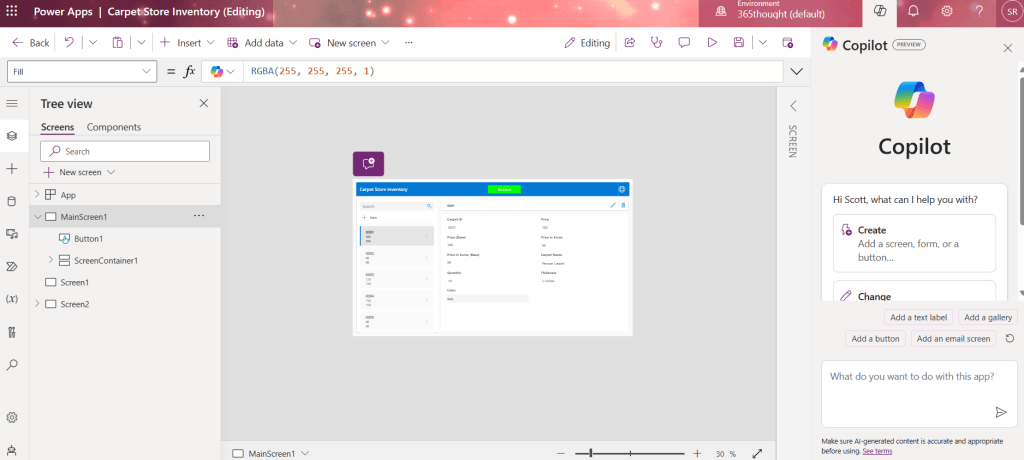
The integration of Copilot into Power Apps Studio marks a significant milestone in the evolution of low-code development. By harnessing the power of Copilot, developers can now access intelligent code suggestions and auto-completions directly within the Power Apps Studio environment, accelerating the app development lifecycle and empowering users of all skill levels to build powerful applications with ease.
Key Benefits of Using ChatGPT in Visual Studio

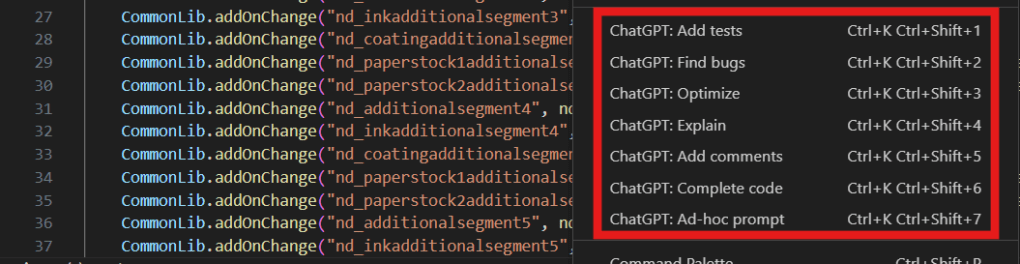
1. Accelerated Development:

ChatGPT streamlines the coding process by providing context-aware suggestions and auto-completions, enabling developers to write code faster and more efficiently. Whether it’s generating boilerplate code, completing function parameters, or suggesting alternative implementations, ChatGPT accelerates development and reduces the time spent on repetitive tasks.

2. Enhanced Productivity:

By automating mundane coding tasks and offering intelligent recommendations, ChatGPT frees up developers’ time to focus on higher-level problem-solving and creative thinking. This not only increases productivity but also fosters a more dynamic and collaborative development environment where ideas can flourish and innovation can thrive.

3. Quality Assurance:

ChatGPT’s AI-driven suggestions are based on vast repositories of code, ensuring that developers have access to best practices, coding conventions, and error-prevention techniques. This helps improve code quality and consistency across projects, reducing the risk of bugs and vulnerabilities and enhancing the overall reliability of Power Apps solutions.

4. Learning and Skill Development:

By working alongside ChatGPT, developers have the opportunity to learn new coding techniques, explore unfamiliar libraries, and experiment with advanced programming concepts. ChatGPT serves as a valuable learning tool, providing real-time feedback and guidance that empowers developers to expand their skill sets and grow professionally.

Real-World Applications of Copilot in Power Apps Studio

The versatility of Copilot & ChatGPT extends across various industries and use cases, revolutionizing the way organizations approach app development. Whether it’s building custom business applications, automating workflows, or integrating with external systems, Copilot & ChatGPT empowers developers to turn ideas into reality quickly and efficiently, driving digital transformation and accelerating innovation.

Conclusion

The integration of Copilot & ChatGPT into Power Apps Studio & Visual Studio represents a change in the way developers approach app development. By combining the power of AI with the simplicity of low-code development, Copilot & ChatGPT empowers developers to write better code, faster, and with greater confidence. Whether you’re a seasoned developer or a novice coder, Copilot & ChatGPT opens up new possibilities, propelling app development into the future and unlocking new levels of creativity and productivity.


Unleashing the Potential of Model-Driven Power Apps with XRM Solutions — May 14, 2024

Unleashing the Potential of Model-Driven Power Apps with XRM Solutions

In the realm of customer relationship management (CRM) and beyond, XRM solutions have long been the cornerstone of businesses looking to streamline processes, enhance productivity, and foster meaningful relationships with their customers. However, with the advent of Model-Driven Power Apps, organizations now have the opportunity to take their XRM solutions to unprecedented heights. Let’s explore how leveraging Model-Driven Power Apps can revolutionize the way businesses approach XRM solutions.

What Are XRM Solutions?

XRM, or “anything” relationship management, extends the principles of CRM beyond customer-centric applications to encompass a wide range of business processes and relationships. Whether it’s managing vendor relationships, tracking assets, or handling regulatory compliance, XRM solutions provide organizations with a versatile platform to digitize and automate various aspects of their operations.

The Power of Model-Driven Power Apps for XRM

Model-Driven Power Apps offer a compelling framework for building sophisticated, data-driven applications tailored to specific business needs. By harnessing the power of the Common Data Service (CDS) and the flexibility of the Power Platform, organizations can create robust XRM solutions that deliver tangible value across the enterprise. Here’s how:

1. Rapid Development and Customization:

Model-Driven Power Apps empower businesses to rapidly build and customize XRM solutions without the need for extensive coding expertise. With intuitive drag-and-drop interfaces, pre-built templates, and reusable components, developers can create tailored applications that align seamlessly with unique business requirements. This agility enables organizations to iterate quickly, adapt to changing needs, and stay ahead of the curve in today’s fast-paced business landscape.

2. Unified Data Model and Integration:

At the heart of Model-Driven Power Apps lies the Dataverse (Common Data Service), providing a unified data model that serves as the foundation for XRM solutions. This centralized data repository enables organizations to break down silos, unify disparate data sources, and gain a holistic view of their operations. Furthermore, with seamless integration capabilities across the Microsoft ecosystem, including Dynamics 365, Office 365, and Azure services, organizations can leverage the full power of their data to drive informed decision-making and enhance collaboration.

3. Mobility and Accessibility:

In an increasingly mobile-centric world, the ability to access and interact with XRM solutions on the go is essential. Model-Driven Power Apps are optimized for mobile devices, providing users with a consistent and intuitive experience across smartphones and tablets. Whether it’s accessing customer data in the field, updating records on-site, or collaborating with team members remotely, mobile-friendly XRM solutions empower organizations to stay connected and productive wherever they go.

4. Insightful Analytics and Reporting:

Data-driven insights are the key to unlocking the full potential of XRM solutions. Model-Driven Power Apps offer built-in analytics and reporting capabilities, allowing organizations to uncover trends, identify opportunities, and track key performance indicators (KPIs) with ease. Whether it’s generating custom reports, visualizing data with interactive dashboards, or forecasting future trends, organizations can leverage the power of analytics to drive strategic decision-making and achieve tangible business outcomes.

Real-World Applications of Model-Driven Power Apps for XRM

The versatility of Model-Driven Power Apps extends across various industries and use cases, empowering organizations to digitize and optimize a wide range of XRM processes. From tracking product quality in a factory, to maintaining driver history in the trucking industry, to gathering maintenance history for railroad crossings, Model-Driven Power Apps offer a comprehensive solution for organizations looking to elevate their XRM solutions to the next level.

Exploring Power Platform Managed Environments — May 9, 2024

Exploring Power Platform Managed Environments

Overview

Power Platform Managed Environments – the cornerstone of Microsoft’s Power Platform ecosystem, empowering businesses to build, deploy, and manage custom apps and workflows with ease. Let’s embark on a journey to uncover the transformative power of Managed Environments and how they can revolutionize the way your business operates.

Understanding Power Platform Managed Environments

At its core, a Managed Environment within the Power Platform serves as a dedicated space where organizations can create and deploy their Power Apps, Power Automate Flows, and Copilot Studio Chatbots securely. This encapsulated environment provides a sandbox-like platform, ensuring that your apps and data remain isolated and protected from external threats. Whether you’re a small business or a large enterprise, Managed Environments offer the flexibility and control you need to unleash the full potential of the Power Platform.

Key Features and Benefits

  • Security and Compliance: With Managed Environments, security is one of the most important things. Administrators have detailed controls over access permissions, data policies, and compliance standards, ensuring that sensitive information remains protected at all times. Whether you’re dealing with customer data or proprietary information, you can rest assured knowing that your data is safe and compliant with industry regulations.
  • Governance and Lifecycle Management: Governance is essential for maintaining order and consistency. Managed Environments provide robust governance capabilities, allowing administrators to define policies, manage resources, and enforce best practices across the organization. Additionally, with built-in lifecycle management tools, you can easily track changes, manage versions, and maintain a clear audit trail of your applications and workflows.
  • Scalability and Performance: As your business grows, so do your technological needs. Managed Environments are designed to scale effortlessly, allowing you to accommodate increasing demands without compromising performance or reliability. Whether you’re deploying a single app or managing a portfolio of solutions, you can rely on the Power Platform to deliver scalability and performance.
  • Collaboration and Integration: Managed Environments facilitate seamless collaboration by enabling teams to co-author apps, share resources, and collaborate in real-time. Power Platform has deep integration with Microsoft 365 and Azure services allowing you to leverage the full power of the Microsoft ecosystem to enhance productivity and drive innovation across your organization.

Summary

Power Platform Managed Environments represent a major shift in the way organizations build, deploy, and manage custom applications and workflows. With their robust security features, governance capabilities, scalability, and integration capabilities, Managed Environments offer a comprehensive solution for organizations looking to harness the full potential of the Power Platform. Please take time to investigate and learn about Managed Environments on your own and feel free to ask a question or leave a comment.

Model-Driven Power Apps are cool, I will prove it to you!!  — May 6, 2024

Model-Driven Power Apps are cool, I will prove it to you!! 

Overview

In today’s rapidly evolving digital landscape, businesses are constantly seeking innovative solutions to streamline processes, enhance productivity, and drive growth. Enter Model-Driven Power Apps – the cool kid on the block revolutionizing the way organizations build and deploy custom applications. But what exactly makes these apps so cool? Let’s dive in and explore the myriad of reasons why Model-Driven Power Apps are the epitome of coolness. 

Rapid Development

One of the coolest aspects of Model-Driven Power Apps is their lightning-fast development process. With intuitive drag-and-drop interfaces and pre-built templates, developers can quickly create powerful apps without the need for extensive coding knowledge. This means businesses can go from concept to deployment in record time, giving them a competitive edge in today’s fast-paced market.

No-Code/Low-Code

Say goodbye to traditional coding woes! Model-Driven Power Apps empower users of all skill levels to create sophisticated applications with minimal coding required. This democratization of app development opens up a world of possibilities, allowing business users to take charge and build apps tailored to their unique needs without relying on IT departments or external developers.

Seamless Integration

Another cool feature of Model-Driven Power Apps is their seamless integration with other Microsoft products and services, such as Dynamics 365 and Office 365. This means users can leverage the full power of the Microsoft ecosystem, incorporating data from various sources and streamlining workflows across different platforms. Whether it’s pulling in customer data from Dynamics CRM or automating tasks with Power Automate, the possibilities are endless.

Scalability

As businesses grow and evolve, so do their technological needs. Fortunately, Model-Driven Power Apps are designed with scalability in mind. Whether you’re a small startup or a multinational corporation, these apps can scale effortlessly to accommodate changing demands, ensuring that your applications remain robust and reliable as your business expands.

Customizability

One size doesn’t fit all, especially when it comes to business applications. That’s why Model-Driven Power Apps offer unparalleled customizability, allowing users to tailor every aspect of their apps to suit their specific requirements. From custom data fields to personalized user interfaces, the ability to customize ensures that your app aligns perfectly with your business processes and objectives.

Mobile-Friendly

In today’s mobile-centric world, having access to applications on the go is essential. Model-Driven Power Apps are optimized for mobile devices, providing users with a seamless experience across smartphones and tablets. Whether you’re in the office, on the road, or working remotely, you can stay connected and productive with your apps right at your fingertips.

Insightful Analytics

Data is the lifeblood of modern businesses, and Model-Driven Power Apps provide valuable insights to help drive informed decision-making. With built-in analytics and reporting tools, users can gain a deeper understanding of their data, uncovering trends, identifying opportunities, and addressing challenges more effectively.

Summary

Model-Driven Power Apps may not be the sexist thing out there but in the world of app development they are very cool. From their rapid development process and no-code/low-code capabilities to their seamless integration and scalability, these apps offer a host of features that make them a game-changer for businesses of all sizes. So why settle for ordinary when you can harness the power of Model-Driven Power Apps and take your business to new heights of coolness? 

Creating Model Driven Power Apps in Dataverse — February 16, 2023

Creating Model Driven Power Apps in Dataverse

Overview

In the world of Microsoft Business Applications many times we are talking about implementing and customizing Dynamics 365 which has many pre-built first party apps.  These Microsoft created first party apps are great as a template when an organization knows that they want to implement one of the classic business processes of Sales, Marketing, Customer Service or Field Service.  Organizations also gain access to restricted record types and business process flows that are valuable when considering and automating these classic business processes. 

Model Driven App Basics

What happens if an organization needs a simple Power App built on the Microsoft Dataverse in the cloud that replaces a legacy application or fills a new business need?  If they have a simplified use case that involves collecting, searching, sharing and relating data.  Without the need or expense of the Dynamics 365 first party apps then they can use the base Microsoft Power Apps functionality to create a Model Driven app on Dataverse to fulfill this need.

Creating the Environment

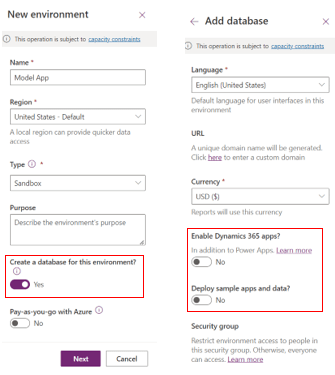
The process is straight forward, an organization needs a Power Apps tenant (https://admin.powerplatform.microsoft.com) to create the Dataverse database environment and start building the app. 

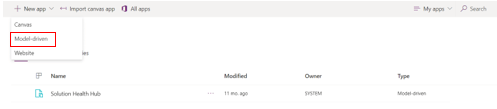
Once the Power Apps environment is created with a related database in the Power Platform Admin Center then you are ready to create the Model Driven App in the Power Apps maker portal (https://make.powerapps.com). 

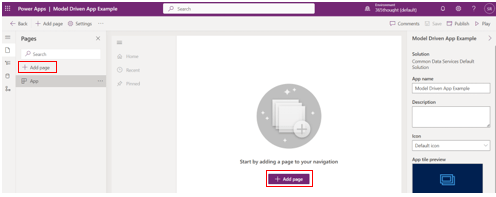
With the Model Driven App created you will need to add your first Page to the App so you can then start to create and place fields (columns) on the Page.

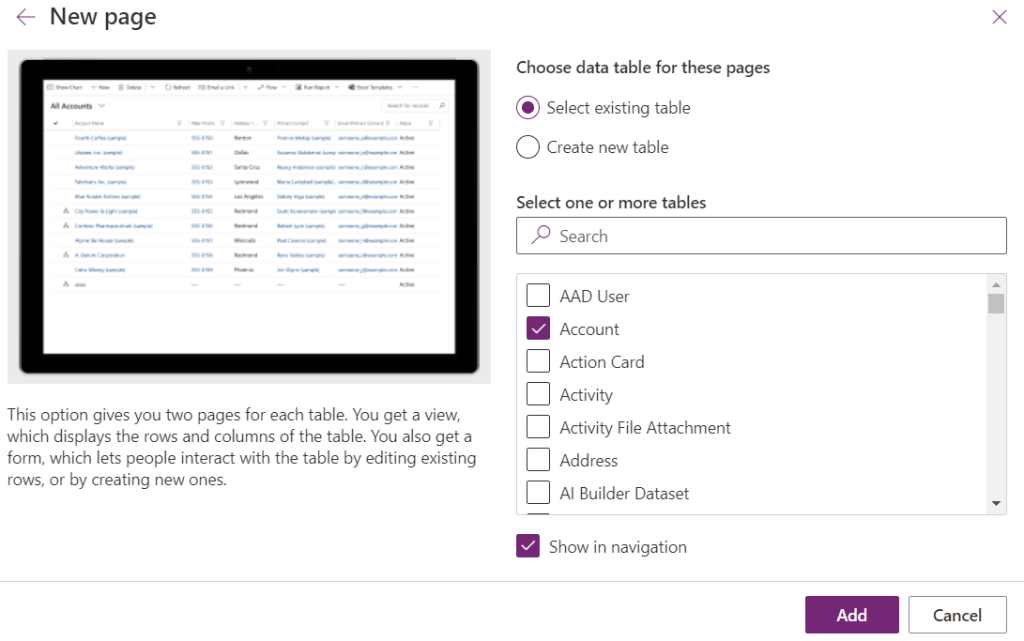
When creating the New Page you have 3 choices, we are going to use Dataverse Table for this example.

There are many pre-built Dataverse tables like Account and Contact that we can choose to add to the new page with fields, forms and views already created.  Alternatively, you could choose “Create new table” which will create a new form and view for the table but you will need to create the related fields.  For this example we are going to select the Account table.

Forms/Views

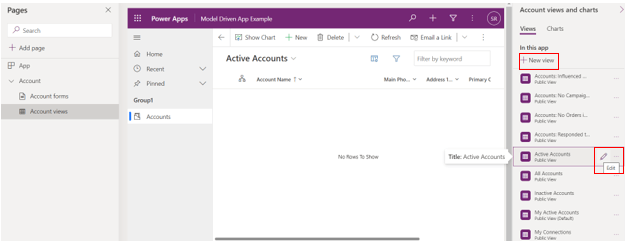
Views are filtered lists of records of a certain type that can have different column configurations.  Views allow users to filter records into more defined subsets of data based on different business needs.  To edit an existing View or create a new View go to the Account views area of the page editor.

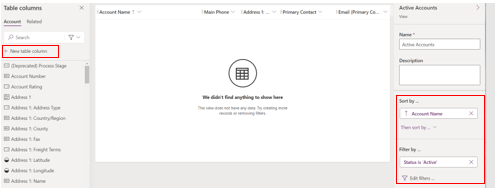
In the View editor you can create new table column (field) and add new or existing columns to the View.  You can also reorder the columns and change the Sort by or Filter by settings.

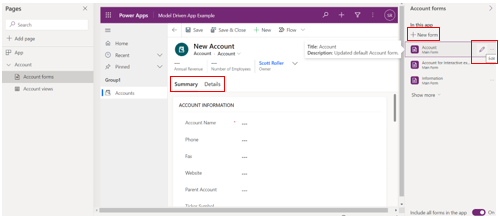
Forms display the fields (columns), sections and tabs in an organized way for a single record.  Like Views, to edit an existing Form or create a new Form go to the Account forms area of the page editor.

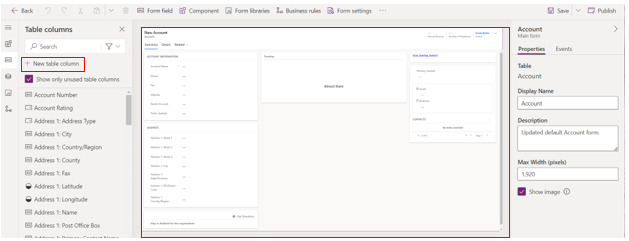
Forms can be organized by different Tabs along the top of the Form and Sections on the Tabs.  In the Form editor you can create new table columns (fields) and organize them on the form in tabs and sections.

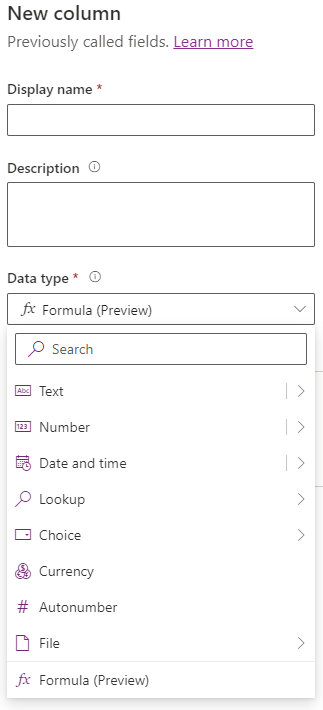
Assuming that you are replacing an existing legacy application with a known database structure or designing a new application with a relational database then creating fields (columns) should be simple.  There are many different column types to choose from depending on your needs; including text, whole number, decimal, date, currency, choice and lookup fields.

Business Process Flow

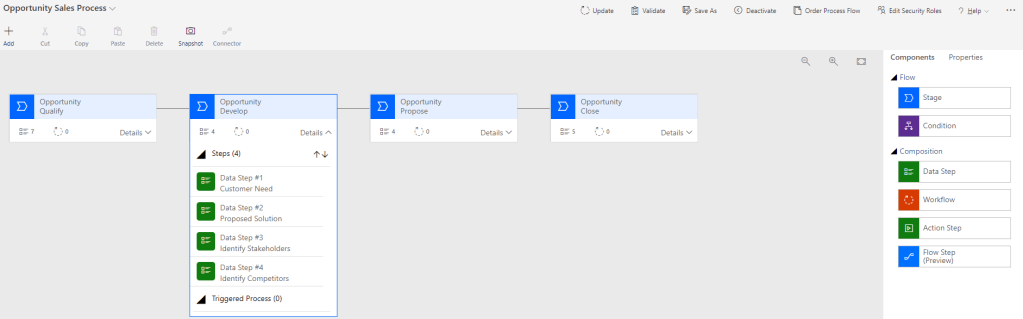
Business Process Flows are available as a tool to guide Users through a complex business process within the Power App.  The best Business Process Flows simplify the process and only give Users the most important, high level fields for each step.  These are the key fields that may also be required for each step with details added on the main Form.  In the example below we can see an opportunity sales process with stages for qualify, develop, propose and close.  Within each stage you can add the data steps which are fields (columns) that are the most important for each stage.  As you can also see on the right side of the screenshot below you can add conditions (logic steps), workflow, action steps and Power Automate Flow steps to be triggered between each stage.

Here’s the finished product.

Workflow/Flows

There are two ways to automate processes in Model Driven Power Apps.  You can use classic workflow which can access all portions of the Power App and Dataverse instance on the Microsoft cloud.  Classic workflow is great when your process trigger and all data changes are going to happen within the same Power Apps/Dataverse deployment.  You also have access to Power Automate Flows which allows for internal & external trigger events, third party data connectors and changing data on external systems.  I’m going to leave the topic of workflow and Power Automate Flow there, as this could be the topic of one or several articles.

Summary

I hope that this helps with the basics of creating a new Power Platform environment and Model Driven App when the Microsoft first party apps are not needed. Once you have a Power Platform environment with a Dataverse database you can start building Model Driven apps with tables, views, forms, fields (columns), business process flows, classic workflow and Power Automate Flows. I will continue to create content on these topics but please let me know if you have any questions or want me to drill down on a topic in more detail.

Filter By Keyword: How Do You Change the Search Columns? — February 9, 2023

Filter By Keyword: How Do You Change the Search Columns?

Hey everyone, I know that this is a topic that new System Admins struggle to figure.  I’m going to address how to add search fields to the Filter by Keyword at the top of entity views.

First let’s discuss the situation and problem.   Most Dynamics 365 deployments have many system and personal Views that are available for end users to use to filter and display the different data types (Accounts, Contacts, Cases, etc.).  These Views, both system and personal, can be quickly filtered using the “Filter by keyword” box in the upper right corner of a View.  The filter by keyword search is limited to a defined list of fields for the record type (Account, Contact, Case, etc.) the user is currently viewing.  In the example above we can only Filter by keyword for Case records by Case Number and Case Title.  If we search for expected values in other fields the search will not find any results.  Luckily there is an easy way to change the fields that are available for search.

So how do we change the search fields for Filter by keyword?  First we need to open a solution in Dynamics that contains the entity that we want to change.  In the example below I am using the Default Solution to access the Case entity.

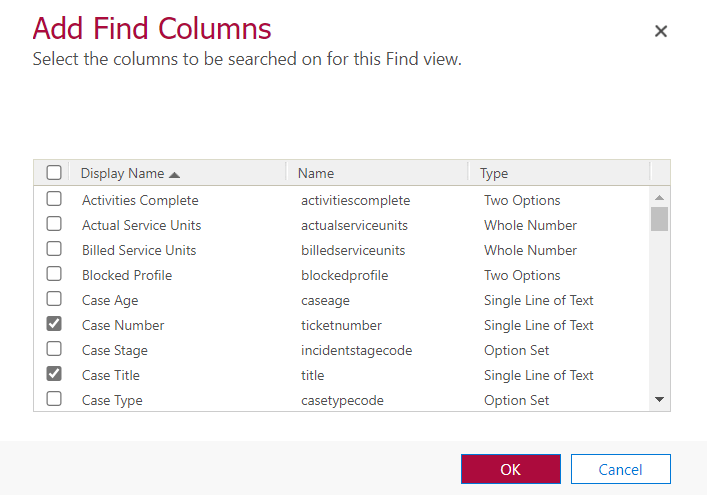
We will then open the Quick Find view and use the Add Find Columns button.

From here you can add or remove fields that will be available in the Filter by keyword search.

All changes will be reflected in the search box after the solution is saved and published.  After publishing is complete use Control>F5 in the browser to complete a refresh and the changes will be available.

To finish up the topic I will briefly cover the other search and view functionality that is available at the top of each entity view.  As stated previously the Filter by keyword search will only look for data in the chosen fields.  It also assumes that what you are searching for “Begins with” the text that you enter in the search box.  You may have also noticed that there are Edit Columns and Edit Filters buttons at the top of the views.  With Edit Columns users can add or remove Columns (fields) and change the field order of the view results without permanently changing the current view. 

With Edit Filters users can change the underlying filter for the view, once again not permanently.  It will display the default filter for the view when pushed which can then be changed by adding or removing row filters and grouping filters together. 

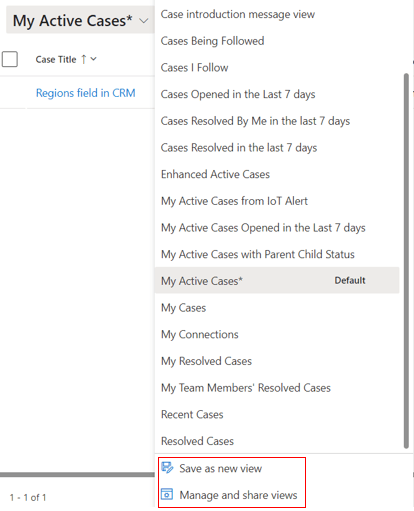
Lastly users can save these view changes as a Personal view if they know that they will need to access the view change in the same format again.  Simply use the “Save as a new view” choice and give it a descriptive name.  Owners of Personal Views can share their views with other users by using the Manage and share views option.

Dynamics Lead Capture Forms: Cutting Through the Confusion — January 31, 2023

Dynamics Lead Capture Forms: Cutting Through the Confusion

If you are setting up Dynamics Marketing Capture Forms for the first time and find it confusing, you are not alone.  I have been working with Dynamics Marketing Capture Forms for a while now, but distinctly remember the challenges I had to work through when setting it up for the first time. 

Follow the steps I have outlined below for a less confusing and frustrating experience than I had the first time I set up a Lead Capture Form.

First off, Marketing Capture Forms allow organizations to create Leads in Dynamics based on data entered on a landing page on a company website.  Contact data is entered on the web page which then triggers Dynamics to create a new Lead.

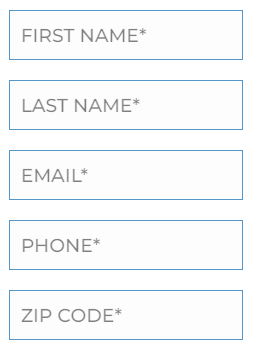
To begin with we need a landing page on a website with Lead data collection fields.  Once you have at least one landing page you can start to configure Marketing Lead Capture to gather data and create Leads.  This is an example of a basic set of fields to capture Lead data from a web page.

After you have a landing page on a website for capturing Lead data then you need to configure a Dynamics 365 Marketing Form to create new Leads based on these submitted fields.  In the Dynamics 365 Marketing app go to Outbound Marketing>Internet Marketing>Marketing Forms and create a new Capture Form.

Enter the URL of the landing page where Lead data will be entered.  If you have multiple landing pages for collecting Lead data then you will need a separate Marketing Lead Capture form in Dynamics 365 for each unique landing page URL.

There is an HTML script that needs to be in the Landing Page code, this sends the Lead Data to Dynamics 365.  When creating a new Lead Capture Form you will need to use the “I need a new script” choice to generate a unique “Form capturing script”.  Use the Copy Script button and paste it into the Landing Page HTML.

After the Tracking Script has been applied to the Landing Page HTML then Dynamics 365 Marketing will recognize the script.  You can then move on to choosing a Lead capture form and mapping the fields from the landing page to Dynamics 365 Marketing.

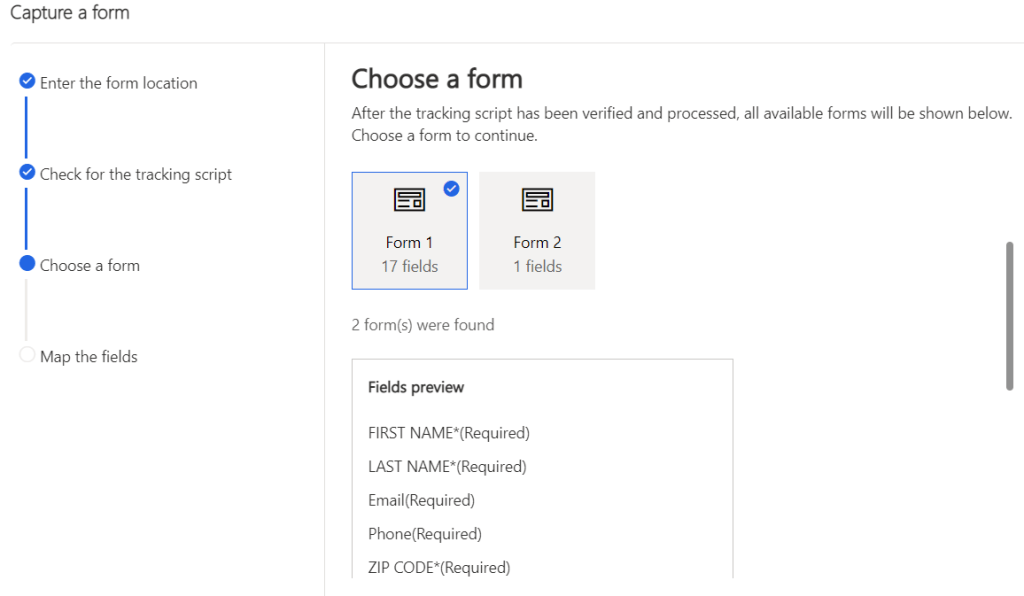
There may be multiple forms on the Landing Page, you want to select the form with the Lead capture data fields.  You can see a preview of the available fields to make sure that you are selecting the correct form.

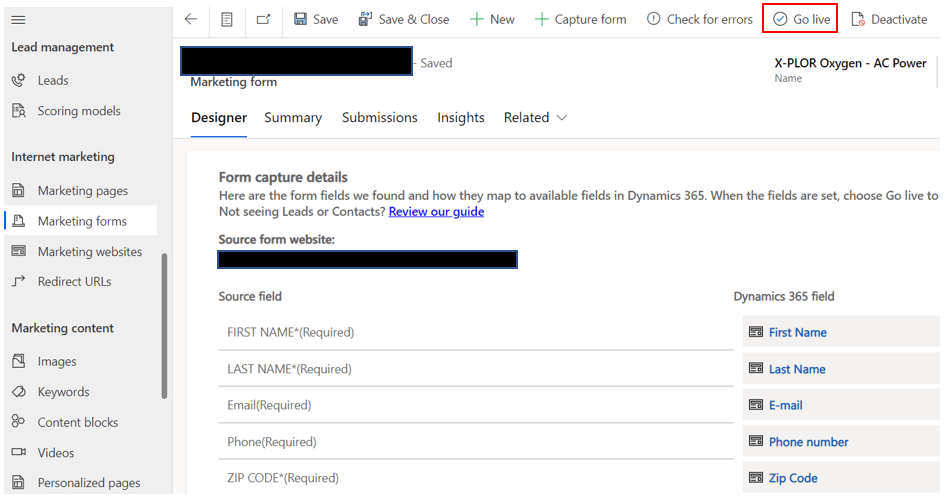
You will then need to select the correct Dynamics 365 Lead fields that match the fields found on the Landing Page.

After you Save and Close the Lead Capture form you will need to reopen the Marketing Form, double check that the fields are mapped correctly and choose Go Live if everything is good.

You now have a working Dynamics 365 Marketing Lead Capture form that is sending new Leads to the Dynamics 365 dataverse.  There is other functionality that you need to consider to prevent duplicate records and get Insights to how the Capture form is being used.  First off you need to decide if you want to prevent duplicate records when records are being created.  You can set the duplicate detection rules and activate the rules from the Summary tab.

Lastly you can see an Overview, list of Submissions or list of Visits to the Lead Capture form, from the Insights tab.

Those are the main features of Dynamics 365 Marketing Lead Capture form functionality.  I hope that this helps clarify the topic and eliminates the trial and error process that I went through the first time I configured a Marketing form.

Oops Factor E80 – Scott Roller — June 18, 2021
Getting to know Dynamics 365 Customer Insights — March 2, 2021
Top 3 Books I Read During Lockdown — February 4, 2021

Top 3 Books I Read During Lockdown

I am taking the chance to review some of the books that I have been reading during the pandemic lockdown.  All of these books came as suggestions from attending Mark Smith’s “90 Day Mentoring Challenge” last year.  One of the silver lining opportunities of the lockdown has been extra time to read and get ahead on business ideas.  In July of 2020 I started an independent IT consulting business centered around Dynamics 365 and Power Platform; these books have been the foundation of building and directing that business.

  1. Company of One by Paul Jarvis
Company of One: Why Staying Small Is the Next Big Thing for Business

Company of One was a real inspiration for me starting as a new sole proprietor in the technology services industry.  The driving viewpoint of the book is that rapid or blind growth for growth’s sake can lead to over extending of resources in a business without a focus.  Many times this blind growth can lead to applying for loans and venture capital money without a strong business plan.  The author sited this unfocused, rapid growth mindset as the leading cause of business failures for startups.  He proposed that staying small with steady growth or even no growth can be the path to business success and happiness in the long run for many industries, including IT services.  If happiness and freedom in life is the ultimate goal, then staying small can be the best business goal.  Keeping business overhead down and little or no employee management responsibilities can lead to greater income and life balance for the business owner.

2. Profit First by Mike Michalowicz

Profit First: Transform Your Business from a Cash-Eating Monster to a Money-Making Machine

I read Profit First right after Company of One and it was a great transition, these two books complement each other very well.  Profit First focuses on the finances of a business and as the title suggests, the whole point of a business is to provide profit to the owner.  The author’s main argument is that too many businesses get caught up in expensive overhead and driving growth through spending.  The result is that profit is pushed into some distant future which in many cases never happens.  The point of a business is to earn profit and there is no reason why profit can’t happen before everything else, if you have proper business planning.  Profit must be built into the business plan and come out first before expenses.  A business has to learn to spend only after a reasonable profit is taking into account.  A company that consistently has no profit is unsuccessful for the business owners

3. The Gig Economy by Diane Mulcany

The Gig Economy: The Complete Guide to Getting Better Work, Taking More Time Off, and Financing the Life You Want

The Gig Economy is all about designing a life around contract work agreements where you are most likely a freelance consultant.  The book is not only about the IT services industry but this example certainly fits the model perfectly.  In the self-directed work/life world of The Gig Economy, freelancers sell their talents to clients on a per project basis.  After the project is over many times the freelancer moves on to another gig with a new contract.  The book is about self-promotion and building a network to keep the contracts coming.  The Gig Economy is also very much about defining your own work/life success, planning for time off between contracts and financing the life you want.  Overall it is about being mindful of the relationship between life and work, and defining the balance for yourself.